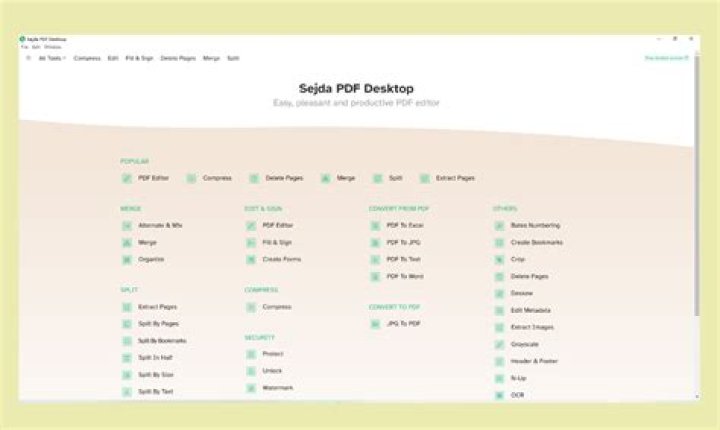
In today's digital world, managing PDF files efficiently is essential for professionals, students, and businesses alike. Whether you're editing documents, converting formats, or organizing large batches of files, you need a reliable PDF tool that delivers speed, security, and simplicity. Enter Sejda PDF, the standout solution that has revolutionized how users handle PDFs. This comprehensive guide dives deep into why Sejda PDF is the best PDF tool for mastering editing, conversion, and management tasks, helping you unlock its full potential.
From quick online edits to advanced desktop features, Sejda PDF offers an intuitive interface and powerful capabilities that outshine competitors. No more struggling with clunky software or risky free tools—Sejda PDF ensures your documents stay secure while you accomplish more in less time. Let's explore everything you need to know to become a PDF pro with Sejda PDF.
What Makes Sejda PDF the Best PDF Tool?
Sejda PDF isn't just another PDF editor; it's a complete suite designed for modern workflows. Available as a web-based platform and desktop app, it supports Windows, Mac, and Linux, making it accessible anywhere. What sets Sejda PDF apart is its commitment to user privacy—no data is stored on servers without consent, and files are processed securely with TLS encryption.
Unlike traditional desktop-only tools, Sejda PDF combines cloud convenience with offline power. Its free tier handles everyday tasks like merging PDFs or adding watermarks, while pro plans unlock unlimited processing for heavy users. For anyone searching for the best PDF tool, Sejda PDF tops the list with its balance of features, ease of use, and affordability.
Mastering PDF Editing with Sejda PDF
Editing PDFs has never been easier than with Sejda PDF. Forget about converting to Word and back—this tool lets you modify text, images, and layouts directly. Start by uploading your file via the intuitive drag-and-drop interface. Sejda PDF recognizes editable text automatically, allowing real-time changes without quality loss.
Text and Font Editing in Sejda PDF
One of Sejda PDF's standout features is its advanced text editor. Change fonts, sizes, colors, and alignment with precision. Need to fix typos in a scanned document? Use the OCR (Optical Character Recognition) tool to make images searchable and editable. Sejda PDF supports over 50 languages, ensuring global compatibility.
For professionals drafting contracts or reports, Sejda PDF excels at adding or removing pages, rearranging content, and even splitting documents. Its whiteout tool erases sensitive info securely, preventing recovery—perfect for compliance with GDPR or HIPAA.
Image and Annotation Tools
Sejda PDF makes annotating a breeze. Draw shapes, add sticky notes, highlight text, or insert stamps with customizable options. Insert images from your device or URL, resize them seamlessly, and maintain high resolution. Businesses love how Sejda PDF streamlines review processes, turning static PDFs into collaborative documents.
- Highlight, underline, or strikethrough text effortlessly.
- Add links to create interactive PDFs.
- Sign digitally with e-signature support.
These editing powers position Sejda PDF as the ultimate PDF tool for anyone tired of bloated alternatives like Adobe Acrobat.
Sejda PDF Conversion: From PDF to Anything and Back
Conversion is where Sejda PDF truly shines, offering batch processing for up to 200 files at once. Convert PDFs to Word, Excel, PowerPoint, images (JPG, PNG), or HTML without losing formatting. Reverse conversions from Office files to PDF are equally robust, preserving layouts perfectly.
Batch Conversion Mastery
Upload multiple files, select output formats, and let Sejda PDF handle the rest. Its AI-driven engine ensures accuracy, even for complex tables or charts. For web developers, extract text or images en masse. Students converting lecture notes? Sejda PDF delivers editable Word docs in seconds.
Pro tip: Use the compression tool alongside conversions to shrink file sizes by up to 90% without visible loss—ideal for email sharing.
Specialized Conversions
- PDF to EPUB for e-books.
- Excel to PDF for secure spreadsheets.
- Image to PDF for quick merges.
Sejda PDF's versatility makes it the go-to PDF tool for diverse needs, from archiving to publishing.
Efficient PDF Management with Sejda PDF
Beyond editing and conversion, Sejda PDF excels in management. Merge unlimited pages, split by size or bookmarks, and reorder with drag-and-drop. Protect files with passwords, 256-bit encryption, or permanent redaction.
Organization and Security Features
Rotate pages, extract specific ranges, or repair corrupted PDFs—Sejda PDF handles it all. Its n-up tool prints multiple pages per sheet, saving paper. For teams, the online version supports real-time collaboration.
Security is paramount: Files auto-delete after two hours in the free version, with longer retention for pros. Sejda PDF complies with strict data protection standards, making it trustworthy for sensitive docs.
- Merge PDFs from URLs or cloud storage (Google Drive, Dropbox).
- Watermark batches for branding.
- Unlock password-protected files ethically.
How to Get Started with Sejda PDF
Getting up to speed with Sejda PDF takes minutes. Visit the website or download the desktop app. No installation hassles for the web version—works on any browser. Sign up for free to access core tools; upgrade for pro features like unlimited tasks.
Step-by-step:
- Upload your PDF via drag-and-drop or file picker.
- Select your task: Edit, Convert, Manage.
- Apply changes using the toolbar.
- Download or share the result instantly.
Tutorials and tooltips guide beginners, while power users appreciate keyboard shortcuts and API integration for automation.
Advanced Tips and Tricks for Sejda PDF Users
To maximize Sejda PDF, leverage scripting for repetitive tasks. The desktop app supports command-line operations, ideal for developers. Combine tools: Edit, then convert, then compress in one workflow.
Optimize scans with deskew and despeckle for pristine results. For large projects, use the task queue to process overnight. Integrate with Zapier for seamless automation—turn emails into PDFs automatically.
Common pitfalls? Always check file size limits on free plans (50MB/200 pages). Pro users bypass this entirely.
Why Sejda PDF Outperforms Other PDF Tools
Compared to Adobe Acrobat, Sejda PDF is lighter, cheaper, and faster—no subscriptions forcing monthly fees. Smallpdf and ILovePDF lack desktop apps and advanced editing. Sejda PDF wins with OCR, batch everything, and true offline mode.
User reviews rave about its speed (processes 100-page docs in under a minute) and 99.9% uptime. For businesses, volume discounts and white-label options seal the deal. If you're seeking the best PDF tool, Sejda PDF's 4.8/5 ratings across G2 and Capterra confirm its supremacy.
Sejda PDF Pricing: Value That Pays for Itself
Sejda PDF offers flexible plans. Free: 3 tasks/hour, 50MB limit. Pro Online: $7.50/week or $63/year for unlimited. Desktop Pro: One-time $79.95 with lifetime updates. Teams get custom enterprise plans.
Every dollar saves hours—no ads, no watermarks on pro outputs. 14-day money-back guarantee ensures risk-free trials.
Conclusion: Elevate Your Workflow with Sejda PDF
Sejda PDF is more than a PDF tool; it's your all-in-one partner for editing, converting, and managing documents effortlessly. From solo freelancers to enterprise teams, its powerful features, ironclad security, and unbeatable value make it the clear choice. Ditch outdated software and experience the future of PDF handling today with Sejda PDF. Sign up now, and transform how you work with PDFs forever.
Ready to master PDFs? Head to Sejda's site and start your free trial. Your productivity awaits.